Equinex Ride Notifications
Receive ride notifications
A rider has added you as their designated ride contact. Sign up to receive SMS notifications when they ride.
- The rider starts a ride (with live tracking link)
- The rider may require attention during a ride
- The rider completes their ride
Reply STOP to opt out at any time. Reply HELP for help. SMS Terms · Privacy Policy
Confirmation text sent!
We sent a text to your phone. Reply YES to confirm and start receiving ride notifications.
You can reply STOP at any time to opt out.
How Consent Works
Equinex uses a double opt-in process to ensure recipients explicitly consent to receiving SMS notifications.
Step 1: Rider adds a contact
In the Equinex app, the rider navigates to Settings and enters their designated ride contact's phone number and name. A disclosure is shown: "Msg & data rates may apply. 0-5 messages/week. Reply STOP to opt out."
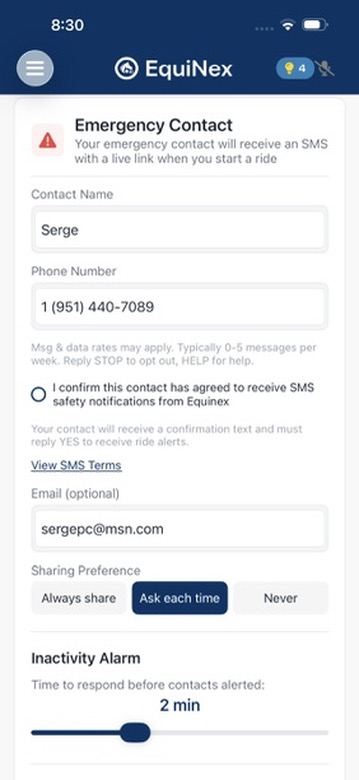
Step 2: Contact receives opt-in request
The contact receives an SMS: "EquiNex: [Rider Name] invited you to receive ride notifications. Reply YES to opt in. Reply STOP to decline. Msg&data rates may apply."
Step 3: Contact confirms by replying YES
Only after the contact replies YES do they begin receiving ride notifications. If they do not reply, no further messages are sent.
Step 4: Opt-out anytime
The contact can reply STOP at any time to immediately stop all messages. The Equinex system honors STOP replies and removes the contact from the notification list.
Alternative: Web-based consent
Contacts can also opt in via this web page (above) by entering their phone number, checking the consent box, and submitting. A confirmation SMS is sent, and they must reply YES to confirm.